Zoom accessory
A physical mute button for Zoom
QuietClick puts your Zoom mute control on the desk, under your hand. Tap once to mute, tap again to speak, and read the LED status without hunting through the toolbar.
Join the early-access list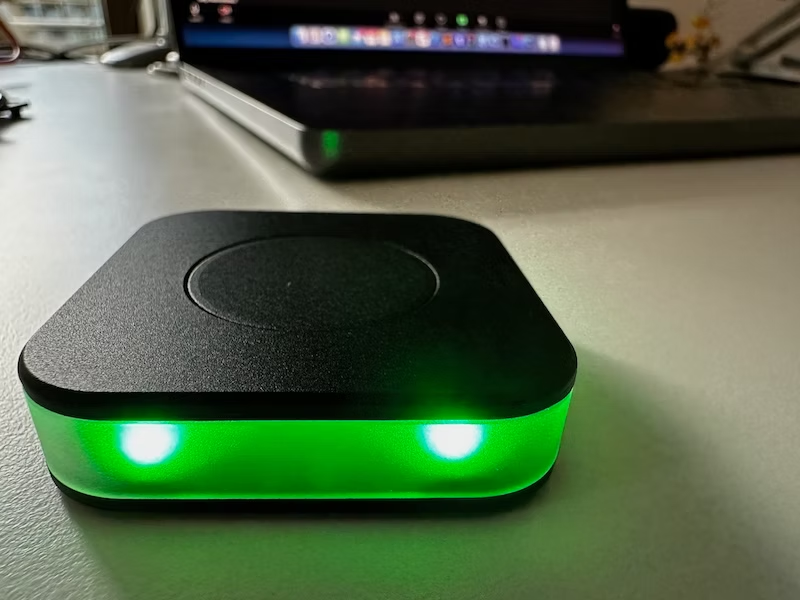
Mute Zoom without losing your flow
Every meeting app puts mute in a slightly different place. When a conversation moves quickly, reaching for a small on-screen icon can mean missing a question or speaking while muted. QuietClick gives that action a consistent physical home. It is a dedicated Zoom mute button for a Mac workspace: a full-surface click that works by touch, with a status light that is easy to read before you speak.
The companion macOS app keeps QuietClick in sync with your real Zoom meeting state. Red means your microphone is muted; green means it is live. That simple visual language is designed for the moments when your screen is busy, your camera is off, or you have stepped away from the desk. You get a quick answer at a glance instead of a second-guessing pause.
Made for real meetings
The weighted puck stays planted during a busy day of calls. Bluetooth LE keeps the desk clear of another cable, while USB-C handles charging and firmware updates. You can map single, double, and long presses to actions such as mute, raise hand, or Do Not Disturb. QuietClick starts with Zoom on macOS and is designed to expand to more meeting tools over time.
It is especially useful for people who move between focused work and back-to-back meetings. The button does not take over your screen, add another dashboard, or ask you to remember a new keyboard shortcut. It gives one common action a clear physical shape, while the light provides a quiet visual check for you and anyone sharing the room.
Frequently asked questions
Does it work with other meeting apps?
Zoom on macOS is supported at launch. System-wide mute provides a useful fallback, with more integrations planned.
What do the colors mean?
Red means muted and green means unmuted. You can customize colors in the companion app.
Explore the wireless mute button or see the macOS mute button setup.